Apple Mail Read Receipts on iPhone, iPad and Mac
Updated October 19, 2026
Apple Mail does not offer a universal built-in read-receipt request for ordinary email accounts on iPhone, iPad or Mac. A separate tracker can record remote-image requests, but those open signals are not proof that a person read the message.
Keeping an AOL address on your phone? Our AOL Mail tracking guide for iPhone and iPad covers secure provider sign-in, app-password eligibility and a controlled test of sends and replies. Mailbox sync alone does not establish tracking compatibility.
Does Apple Mail support read receipts?
Apple Mail does not include a standard sender read-receipt button that works consistently across iCloud, Gmail, Outlook and other providers. That is true even though the Messages app has its own read-receipt setting for iMessage conversations. Email and iMessage are separate systems, so an iPhone instructions page for Messages does not add receipts to Mail. Our side-by-side comparison explains what each status means.
If you searched the iPhone Mail settings and found no read-receipt switch, you did not miss a hidden menu. Decide whether you need a formal acknowledgement, which requires a supported provider workflow and may involve the recipient, or an approximate open signal from remote image loading. The free iPhone tracker guidecompares those choices before you install another app.
Some managed email services support traditional receipt requests in their own apps or web interfaces. Google, for example, limits its built-in Gmail receipt request to eligible work or school accounts. The recipient or organization may still decline or suppress the receipt. A third-party Apple Mail tracker uses a different mechanism.
A message returning to the top of your inbox is also separate from a receipt. The Apple Mail Follow Up comparisonexplains automatic suggestions, incoming-message reminders and open signals, so you can choose the right evidence before sending a follow-up.
How Mail Tracer adds read receipts
Mail Tracer adds a tiny tracking image to a message. When the recipient opens the email and their application or another mail system loads that image, an open event is recorded. You can then review the event time and open history. The wording matters: the event records an image request, not a verified person reading the words.
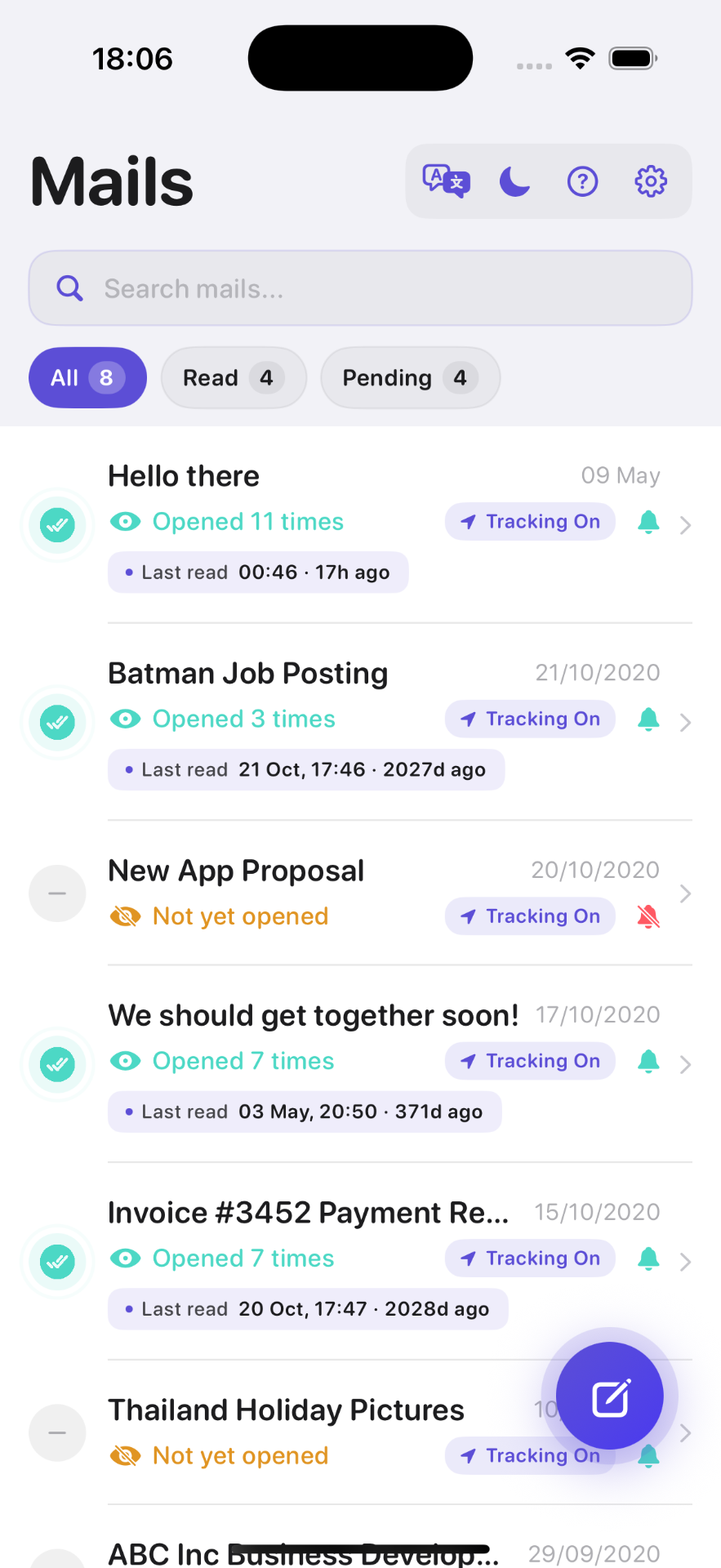
Delivery receipts versus read receipts
A delivery confirmation only means that the receiving mail server accepted a message. A read receipt or open event indicates that the message's content was loaded. Neither method can guarantee that the recipient carefully read or understood the message.
Can you see if someone read an email in Apple Mail?
You can sometimes see an open signal from image-based tracking, but you cannot establish that someone read or understood the message. A preview pane, security scanner, forwarded copy or privacy service may load remote content. Conversely, a recipient can read the email while blocking images, leaving no detectable event.
If you need confirmation for a proposal, invoice or deadline, ask for a reply. Use the open signal only to decide whether a neutral reminder may be useful. The broader email read-receipts guide compares delivery confirmations, traditional receipts and tracking pixels.
Use Apple Mail as usual
Connect your existing account and continue composing through Apple Mail. Mail Tracer works with accounts configured there, including iCloud, Gmail, Outlook, Yahoo and other IMAP accounts, and provides tracking history and notifications. Sending directly from the Gmail or Outlook mobile app is a different workflow. Test with an address you control before using tracking for an important message.
Does Apple Mail Privacy Protection affect read receipts?
Yes. Apple's Mail Privacy Protection guide says the feature prevents senders from learning whether a recipient opened a message and masks the recipient's IP address. Remote content can be downloaded privately in the background, so an event may occur at a time unrelated to human reading and location details may describe a relay rather than the recipient.
Do not turn one timestamp or approximate place into a claim about what the recipient did. Our iOS 27 privacy guideexplains how the current Apple setting changes interpretation, and the guide to multiple opens covers repeated events.
When read receipts may not work
- The recipient blocks remote images
- The email is viewed as plain text
- A privacy proxy loads the tracking image
- A company security scanner preloads links or images
- The recipient is offline when viewing cached content
If a test produces no alert, verify that you sent from the account and app you configured, then check notification permissions and repeat the test with remote images enabled in the receiving inbox. The iPhone troubleshooting checklist separates setup problems from privacy-related signal gaps.
Does turning on a read receipt notify the other person?
A traditional read-receipt request can be shown to the recipient, depending on their mail client and organization. Image-based tracking generally does not display a receipt prompt, although a mail client may show that remote images are blocked or being loaded. Be guided by the relationship, applicable rules and the recipient's expectations. Respect requests not to track and never present an open as hidden proof.
What should you do after an Apple Mail open alert?
- Check whether the event timing is plausible or could be an automated preload.
- Look at the agreed deadline or next step rather than the open count alone.
- Wait an appropriate amount of time for the context.
- Send a neutral follow-up that repeats the action or offers help.
- Ask for a direct confirmation when acknowledgement genuinely matters.
For role-specific examples, see the email tracking use-cases guide. It covers freelancers, job seekers, sales teams and other situations where a restrained open signal may help without being treated as certainty.
Frequently asked questions

Add tracking to your email in minutes
Mail Tracer is free to download. Get read notifications on your iPhone and iPad.
Related guides
- GuideAOL Mail Read ReceiptsSet up AOL Mail read receipts on iPhone with Apple Mail tracking. Check secure sign-in, test Mail Tracer on iPad and follow up without treating opens as proof.
- GuideFollow Up vs Email TrackingCompare Apple Mail Follow Up vs email tracking on iPhone. Set useful reminders, test Mail Tracer and separate open alerts from replies before following up.
- GuideEmail Tracker for iPhoneUse an email tracker for iPhone and iPad with Apple Mail. Compare account fit, test open alerts, and understand privacy limits before your first tracked email.
- GuideEmail Read ReceiptsLearn how email read receipts work in Apple Mail, Gmail and Outlook, what a tracking pixel can show, and why a receipt is not proof of reading.