Outlook Read Receipts on iPhone: What Works
Updated October 12, 2026
Outlook read receipts on iPhone are available only in some Microsoft account and app configurations, and the recipient can decline them. For an Outlook account used in Apple Mail, Mail Tracer provides pixel-based open signals instead—useful context, but not proof that a person read the message.
Does Outlook have read receipts on iPhone?
Microsoft announced delivery and read-receipt controls for Outlook on Android and iOS in March 2025. Its published rollout notes describe the feature for Enterprise and School accounts, not every Outlook.com account. Microsoft also says recipients must approve a read receipt request before the sender receives one.
The announcement's availability section describes beta and TestFlight versions and a staged production rollout. It is a documented setup reference, not proof that the option appears in every current Outlook installation. Our Apple Mail versus Outlook email tracking comparison helps you verify your own account and sending app before choosing either workflow.
Check your own compose toolbar instead of assuming the control is available. In Outlook for iOS, start a draft, tap the plus button, and look for a Receipts icon. If it is absent, your account, administrator policy, app version, or rollout status may not support it. Microsoft documents the steps in its official Outlook mobile announcement.
How to request an Outlook read receipt on iPhone
- Open a new or existing draft in the Outlook app.
- Tap the plus button in the compose toolbar.
- Choose Receipts, if the option appears for your account.
- Select a delivery receipt, a read receipt, or both.
- Return to the draft, check the confirmation banner, and send.
A delivery receipt confirms that the message reached the recipient's mailbox system. A read receipt asks for confirmation that the recipient opened it. The latter remains under the recipient's control: they can choose not to send it. For multiple recipients, Outlook applies the selection to everyone on the message, but each person or mail system can handle the request differently.
How to track an Outlook account through Apple Mail
Mail Tracer follows a different route. It is designed for messages sent from Apple Mail, including messages from Outlook.com and compatible Microsoft Exchange accounts configured there. It does not add controls to Microsoft's Outlook app.
- On iPhone, open Settings and go to Apps, Mail, then Mail Accounts.
- Add or confirm the Outlook or Exchange account you want to use in Apple Mail.
- Connect that same account in Mail Tracer.
- Compose and send the message from Apple Mail, not from the Outlook app.
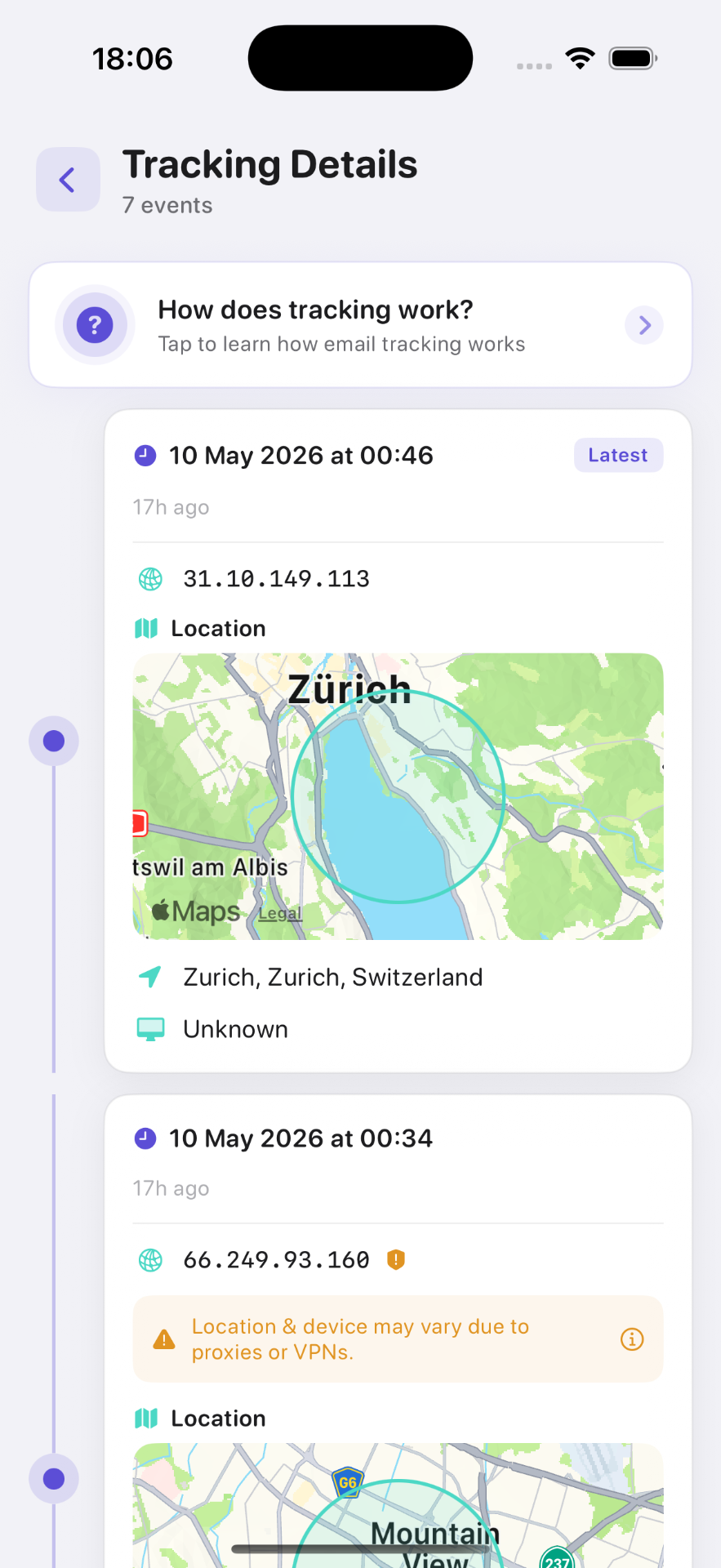
- Use Mail Tracer's timeline to review any detected open events.
Test the setup with a second address you control before relying on it for an important message. Open the test email once with remote images enabled and once with them blocked. The result will show how the recipient's mail client and privacy settings affect your workflow.
Outlook receipt or Mail Tracer open signal?
| Method | Best fit | What it tells you | Main limitation |
|---|---|---|---|
| Outlook delivery receipt | Supported Microsoft work or school workflows | The receiving system accepted the message | It does not show that a person opened it |
| Outlook read receipt | Formal requests where the recipient can respond | A recipient-approved confirmation | The request can be declined or unsupported |
| Mail Tracer open signal | Outlook accounts used in Apple Mail | A remote image was requested | Privacy relays, blockers and scanners affect accuracy |
What can an Outlook open signal show?
- The time of the first and most recent detected image request
- The number and sequence of detected open events
- Device or mail-client information when the network exposes it
- An approximate network location, which may belong to a proxy or data centre
- A push notification that can help you time a calm follow-up
None of these fields identifies who was looking at the screen or proves that they understood the message. A preview pane, forwarded message, your own Sent folder, or an automated system can load the image. Treat the timeline as supporting context, then rely on a reply for confirmation.
Why Outlook receipts and open signals can disagree
The two methods observe different events. Outlook's requested receipt depends on the recipient's software and choice. Pixel tracking depends on remote image loading. One may succeed while the other does not.
- A recipient can read the message but decline the requested receipt.
- Images can be blocked, so a real read produces no open event.
- A security gateway can fetch an image before the recipient sees the email.
- A privacy proxy can hide or replace device, IP and location details.
- Repeated previews or forwards can create multiple open events.
If the timeline looks surprising, use the troubleshooting steps in our iPhone email tracker checklist and the explanation of multiple open events.
How to follow up without overclaiming
Do not write, “I know you read this.” A neutral message is both more accurate and more respectful: “I wanted to make sure this reached you. Is there anything else you need from me?” For an invoice, application, or contract, follow the documented process and deadline rather than using an open event as legal proof.
The broader email read-receipts guide compares Apple Mail, Gmail and Outlook, while the email tracking use-cases guide gives practical follow-up patterns for work and personal messages.
Frequently asked questions

Add tracking to your email in minutes
Mail Tracer is free to download. Get read notifications on your iPhone and iPad.
Related guides
- GuideApple Mail vs Outlook TrackingCompare Apple Mail vs Outlook email tracking on iPhone. Test Mail Tracer open alerts or account-dependent receipts, keep your address and follow up responsibly.
- GuideEmail Read ReceiptsLearn how email read receipts work in Apple Mail, Gmail and Outlook, what a tracking pixel can show, and why a receipt is not proof of reading.
- GuideEmail Tracker for iPhoneUse an email tracker for iPhone and iPad with Apple Mail. Compare account fit, test open alerts, and understand privacy limits before your first tracked email.